

The Lounge

Find answers, ask questions, share tips, and connect with our community around the world.

  • Headphone Level Question

    Posted by Jesse Lewis on March 16, 2026 at 5:59 am

    Greetings MP friends,

    I have a question about recording — specifically about getting more headphone level while recording.

    I’ve been producing an album for someone and helping them record in their home studio, so I’m not as familiar with the gear as I am in my own studio. They have an EVO 16 audio interface, which I’ve been using with Ableton for tracking.

    My client is complaining that he can’t get his headphones loud enough while recording, mainly for vocals and acoustic guitar at this point. I checked the headphones myself, and the level is loud — certainly loud enough to record — but it’s noticeably quieter than the headphone output on my Apollo interface.

    From what I’ve researched, it looks like the EVO provides around 12 dBFS of headphone output compared to over 20 on the Apollo, so I understand it delivers less gain than many interfaces. I’ve checked that there are no pads engaged or anything like that. Both of us have to turn the headphone volume close to maximum (100) to feel like we’re getting sufficient level.

    So I guess I have two questions:

    1. Headphone level while recording
    If the mic gain is set appropriately, no pads are engaged, and the headphone volume is maxed out, does that mean we’ve reached the maximum achievable headphone level from the interface? Would this be a situation where a headphone amplifier could help? For example, if I ran a line output from the interface into a headphone amp, could we achieve a louder headphone mix that way?

    2. Playback louder than direct monitoring
    Something else that confused me: in the mixer console we can adjust the DAW playback level, and when I raise the playback level while listening back to the exact same tracks we just recorded (vocals and acoustic guitar), I can get noticeably more headphone volume during playback than during recording.

    All faders are at unity, there’s no processing on the tracks, and no limiters or processing on the master channel. Since the DAW is routed back through the same audio interface, I don’t understand how playback can be louder than the direct monitoring signal coming in. Are DAWs somehow louder than direct input monitoring, or am I misunderstanding the signal flow?

    Sorry if this is confusing — but if this makes sense to anyone, I’d love to hear whether you’ve experienced something similar and what the best solution might be for getting more headphone level.

    Thanks in advance for any insight or advice!

    JLew

    Joe Robinson replied 2 weeks, 5 days ago 4 Members · 15 Replies
  • 15 Replies
  • Paul Tucci

    Member
    March 16, 2026 at 10:13 am

    Jesse,

    Another variable in this situation may just be the headphones themselves. Some are more efficient at converting a certain voltage level into loudness. I’ll make an automotive analogy. Some cars can go further on a gallon of gas than others. The ones that have better gas mileage are more efficient at translating the inherent energy in a gallon of fuel into work as measured in miles traveled. Do you both listen on the same model headphones?

    Yet another possibility would be the impedance of the headphones. The low impedance (resistance) types (8-sh OHMS) are a bit more efficient / louder than the high impedance (resistance) types (600-ish OHMS.) That’s just the law. Oddly enough, today dude OHMS would be 237 years old today. Nice timing Jesse.

    @-PT

    • Jesse Lewis

      Member
      March 16, 2026 at 1:00 pm

      Thanks, @-PT ! I knew you’d have something helpful to add to this discussion! ❤️

      Aaaaand…Happy Birthday Mr OHM! Incredible!

      I also thought about the headphones as well, and indeed, my clients headphones ARE a bit quieter than mine, however, I have been bringing my Audio-Technica ATHM 50 X headphones from my house, which I’m familiar with and are plenty loud at my home studio (and not as loud at his house) so I’m definitely thinking it’s again output/software console issue…

      Best,

      JLew

      • Dana Nielsen

        Administrator
        March 16, 2026 at 1:12 pm

        WOAH – @-PT – I didn’t put it together that it’s your birthday!! Happy birthday “dude OHMs”!!! 🎉👯‍♂️🪩🍣

        • Jesse Lewis

          Member
          March 16, 2026 at 1:19 pm

          Wait – IS it @-PT birthday???

          It literally IS George Simon Ohm’s birthday today (which is so insane) which I looked up after Paul mentioned it… because I clearly don’t have enough to do today haha!

          If it’s P$’s BDAY — then we should celebrate, and if not, I say we make March 16 — “PT Day at MP” haha

          ❤️

          • Paul Tucci

            Member
            March 16, 2026 at 3:41 pm

            It is not. What kind of self serving knucklehead would do that? I wouldn’t, until maybe next week.

            • Jesse Lewis

              Member
              March 16, 2026 at 4:26 pm

              😃

            • Dana Nielsen

              Administrator
              March 17, 2026 at 11:07 pm

              Hahaha – well, now you know you should let us know when it’s your bday, Paul! We’re all ‘here for it’, as the kids say. 💜🧁

  • Dana Nielsen

    Administrator
    March 16, 2026 at 11:42 am

    Jesse!

    Great troubleshooting and thanks for all the info you provided 👌

    I don’t know that interface specifically, but I’m 99% certain I understand what’s going on and how to fix it.

    Many audio interfaces have their own software-level control like the one you mentioned in your post. This volume control happens in the software before the signal even arrives at the interface.

    So… the level at which you set the software will affect the loudness off the DAW to all areas of the interface (speaker volume via monitor outputs, headphone volume via headphone outputs).

    Here’s a likely fix:

    1. Set the interface’s software “DAW output level” to Unity / 0db / 100% / or whatever is its native default “full-output” state
    2. Use the interface’s physical “monitor out” volume knob to control speaker volume (you’ll prob need to turn it way down now that software control has been reset to Unity)
    3. Enjoy much louder headphones!

    Couple add-on notes:

    • see @-PT‘s excellent reply re headphone models and OHMs. Some headphone models do require a lot more output to get them sounding nice and loud.
    • … to that end, yes, you hit the nail on the head re external headphone amp. You could definitely designate a separate pair of line outputs to be used for headphones. Feed that stereo pair to either a) a stereo power amp that feeds passive headphone distribution boxes like my beloved Redco Audio “little red cue box”; or b) an all-in-one powered headphone distribution system.

      BUT …. I highly doubt you’ll need this in your situation once your interface software is correctly gain-staged.

    Keep us posted!!

    • Jesse Lewis

      Member
      March 16, 2026 at 1:10 pm

      Thank you @dana!

      This is all very helpful, and I’m going to look into all of the things you mentioned. The only thing I wanted to add is that the volume difference I’m describing is between direct monitoring (just listening through the interface) and the DAW playback of the same performance.

      In other words, when we’re recording — which is when he feels like the headphones aren’t loud enough — we are bypassing the DAW entirely, I believe, because I have DAW input monitoring set to Off. So we’re only monitoring what’s coming directly through the audio interface.

      I believe you were suggesting that I turn up the playback level in the software, which does make things louder during playback. However, I don’t think that would affect the level while we’re recording with input monitoring turned off. Is that correct?

      ❤️
      J🐻

      • This reply was modified 3 weeks ago by  Jesse Lewis.
      • Dana Nielsen

        Administrator
        March 16, 2026 at 1:50 pm

        Ohhh interesting – hmm, it may be that the headphone amp itself isn’t very powerful, as you alluded to in your original post.

        One simple, low-budget workaround would be to “supplement” the interface’s built-in HP amp with a powered splitter like this one from Mackie.

        DISCLAIMER: Your hi-fi audiophile friends will mock you cause you’d be double-amping your headphone output, but it’ll totally work and nothing will break and you’ll prob get some additional output gain from the powered splitter. (I have @cmn‘s studio rigged this way and it works fine — UAD Twin > built-in HP out (set at Unity Gain) > inexpensive 1×4 powered headphone splitter > Audio Technica headphones.

        SIDENOTE: FWIW, I never use “direct monitoring” personally. I always want to perform to the version of the mix with all the FX on it. Here are some ways I manage latency to make that possible:

        • During the recording phase, I keep my hardware buffer size as low as my system allows (usually 64-128 samples) and I steer clear of plug-ins with notoriously large latency. This means while tracking I tend to stick to very efficient reverb plugins, etc.
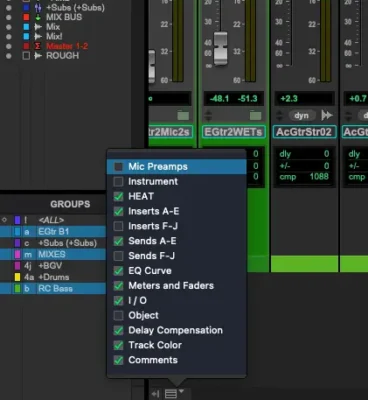
        • I’m always keeping a close eye on which plugins are inducing the most latency so I know which to temporarily deactivate if I need to do a quick overdub. In Pro Tools this is done by enabling the “Delay Compensation” view checkbox in the mix window.
        • When I feel like all the recording is done and I’m now mixing the record, I might start swapping out reverbs and/or adding some of my favorite heavy-latency plugins as needed.
        • Jesse Lewis

          Member
          March 16, 2026 at 2:27 pm

          Thank you SOOO much @dana! I feel like I have some really good options here to get the headphones louder. ❤ – abuela

  • Joe Robinson

    Member
    March 17, 2026 at 8:48 am

    Hi Jesse! Just saw this post and it seems like you have your answer, perhaps it’s a software output setting.

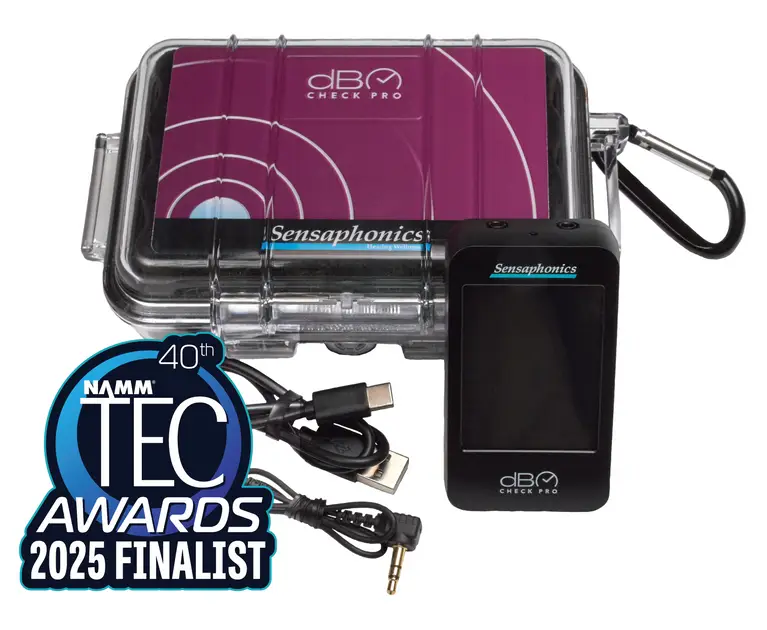
    I’ve actually been having the opposite problem, where I record for a few hours and then realize my ears are ringing and I had my headphones too loud, i tend to crank my in-ears especially. Anyhow I just picked up this new device called the DB Check Pro by Sensaphonics, which calibrates to your headphone model and gives you a DB average and tells you how long it is safe to be exposed.

    Pretty cool and I hope you are well!!!
    Joe

    • Jesse Lewis

      Member
      March 17, 2026 at 12:58 pm

      Wow! Right on @joerobinson ! I’m gonna check that out! Thanks for the tip!

      Wishing you and your family all the best! ❤️

      JLew

    • Dana Nielsen

      Administrator
      March 17, 2026 at 10:58 pm

      Ooh, that’s sounds like a great tool, Joe, thanks!

      I find in-ears to be especially deceptive when it comes to loudness and fatigue. I love ’em – don’t get me wrong – but yeah, when I’m in them for a long time, taking them out sometimes leaves me feeling aurally exhausted. 👂😮‍💨

      Thanks for the great tip!

      Adding a link here for anyone interested. It’s wild how different the recommended ‘safe listening time’ is btwn NIOSH and OSHA … NIOSH is like “no more than 47 mins at 95db average” and OSHA’s like, “let’er rip for 4 hours – you’ll be FINE!” lol

      https://www.sensaphonics.com/products/db-check-pro

      • Joe Robinson

        Member
        March 18, 2026 at 7:42 pm

        Cheers Dana!! I was thinking the same thing with the difference between OSHA & NIOSH!!!

Log in to reply.